

Nintex Automation Cloud
Start with a workflow export ZIP. Review connectors, action mappings, and the work needed in your destination.
Explore this migration pathFlow Migrator · by Horton Scientific
Get a clear starting point for Power Automate.
Analyze a Nintex export to find supported mappings, configuration needs, and gaps. Build your plan, then generate supported packages when you’re ready.
Your analysis is free with an account. Explore the sample without signing up.

Choose the guidance that fits your source environment or the project you need to deliver.
Start with a workflow export ZIP. Review connectors, action mappings, and the work needed in your destination.
Explore this migration pathBring a .nwf or .wf export. Check list dependencies, identities, start conditions, and the work that remains.
Explore this migration pathDefine a representative pilot, agree on responsibilities, and build a defensible delivery estimate.
Explore this migration pathCompare conversion, rebuilding, and redevelopment · Share the buyer’s brief
Explore the anonymized Daily Operations Summary example. Start with the analysis, then inspect the settings and export screen. Select a step to read it at your own pace.
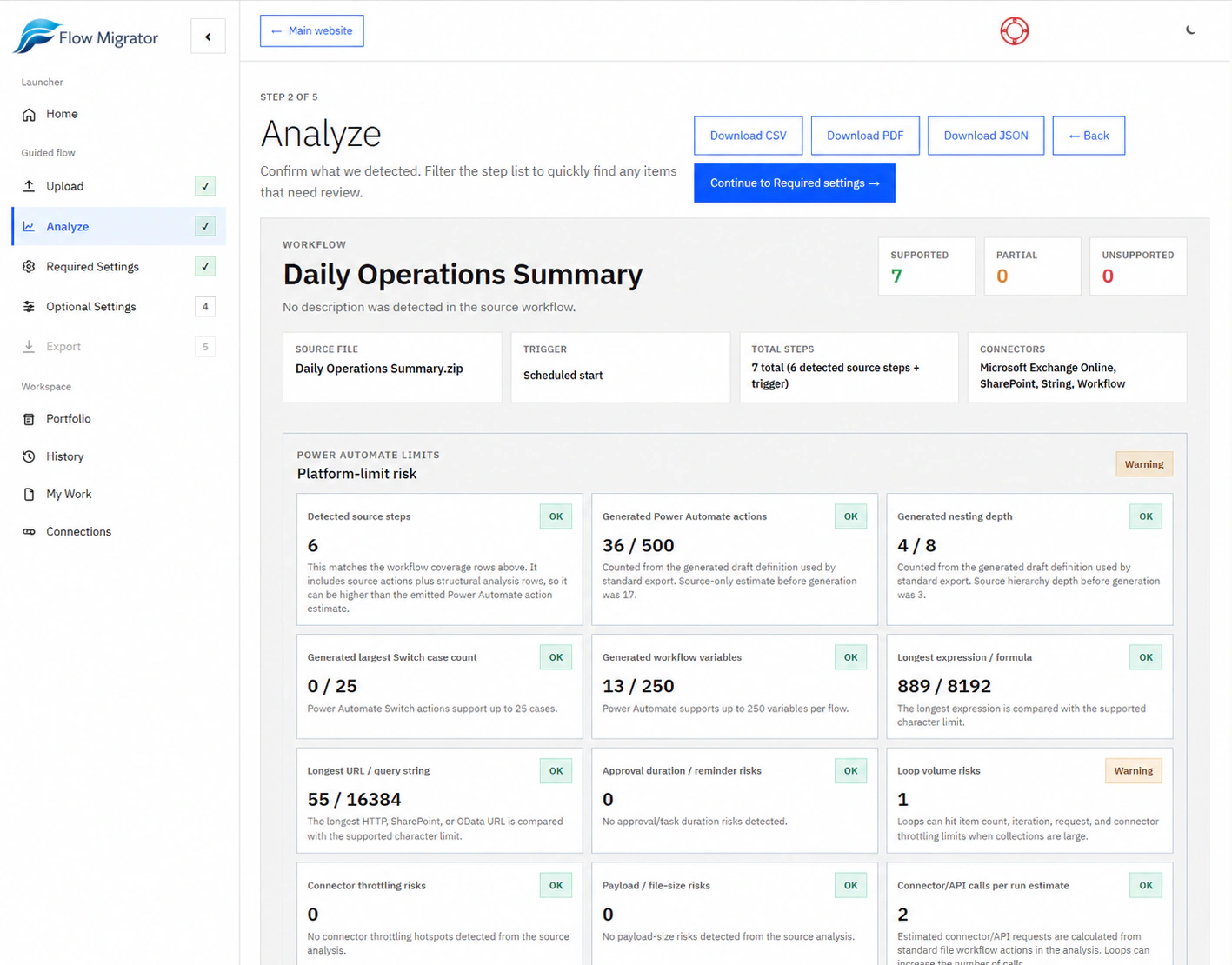
This example lists seven supported steps and includes a loop-volume warning. Review action coverage and platform findings together.
Open Required settings to review trigger behavior and destination requirements. Coverage alone does not verify runtime behavior.
Review the detected steps, action coverage, and platform-limit checks before continuing.
Anonymized product demonstration. Screens show the review process; results and export allowances depend on your workflow and account.
The sample analysis lists seven supported steps and includes platform checks. The settings screens show the decisions reviewed before package generation.
The export screen has validation pending. These screenshots do not show a completed import or a tested production workflow. Credit allowances depend on your account; this sample account shows unlimited access.
Explore the interactive sample report · Get the example files and validation worksheet
Use the report, draft, and supported output to move the project forward.
See the detected trigger, actions, connectors, and steps that need attention in one coverage report.
Choose a useful pilot and give the project a clearer scope.
Inspect the generated draft and work through the trigger, destination, and connection settings.
Give builders and reviewers a concrete starting point.
Use your export access to create a Power Automate package for a workflow that reaches an exportable state.
Take conversion output into your implementation and test environment.
Start with a Nintex Automation Cloud export ZIP or a Nintex for SharePoint .nwf or .wf export.
Review the detected workflow, action coverage, and flagged gaps. Check the relevant compatibility notes.
Confirm trigger behavior, map destinations, and resolve the required settings for your workflow.
Create a supported package with your available export access. Use the validation checklist for the next stage.
Sign in or create a free account to begin.
Compare manual and assisted work with visible assumptions. Calibrate the estimate after a pilot.
Open ROI calculator Complex workflowsExplore the parent and child solution starting point for workflows that exceed supported platform limits.
Explore limit remediation Your first workflowChoose your source and preparation stage. Get a checklist for the export, dependencies, and tests your pilot needs.
Plan the first evaluationNeed to review uploaded data or optional tenant connections? Read security and data handling.
Start with one workflow, then choose the export allowance that fits your project.
Review coverage and the work flagged for attention before using export capacity.
Start free analysisOne export credit for a new workflow. A focused starting point for a supported package.
View export optionsTen export credits for a small project. Re-export the same workflow after adjusting settings without another credit.
View export optionsEstimate the cost and allowance for your workflow count
A credit is used when a package is successfully generated for a new workflow. Re-exporting that workflow does not use another credit. If package generation fails, no credit is spent.
For a larger project, the Wave Pack includes 50 exports for $1,499. The team / consultant plan is $2,999/year with 150 included exports; additional 50-export bundles are $999.
Compare all options and termsBring a representative Nintex export. Review the conversion findings and decide what to configure, generate, or rebuild next.
Free account required. Package generation depends on workflow support and your export allowance.


